Windows 8 Developer Preview is up

Recommended Videos

devotedsniper

New member
Dec 28, 2010
752
0
0
viranimus said:
devotedsniper said:
Anyone got this running on a Virtual Machine? VMware i get some error, and microsoft virtual machine 07 (x64 edition) wont install x64 os's (how good is that lol). Looks like i'm going to have to partition my hard drive..
Honestly if your going to try to run it off of virtualization, I would try it in Virtual box, ( http://www.virtualbox.org/ ) because honestly my experience has been that anything tied directly to Microsoft and virtualization is not well conceived.


Other thought:
As for Win8 has anyone been able to identify what sort of limitations are present(outside of the whole OS being semi neutered) in the developer preview?
I got it working on vbox, it doesn't work straight away you need to tweak the settings (follow this: http://www.sysprobs.com/guide-install-windows-8-virtualbox ), i will find out the limitations soon enough as it's installing right now.
 

devotedsniper

New member
Dec 28, 2010
752
0
0
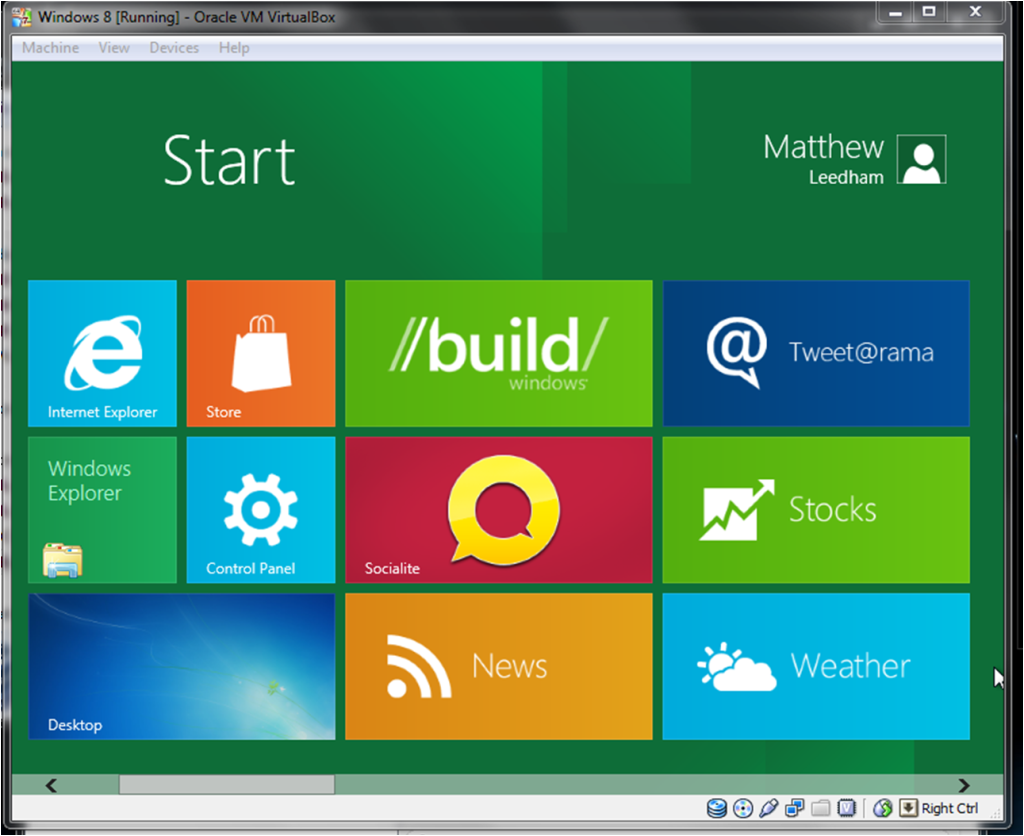
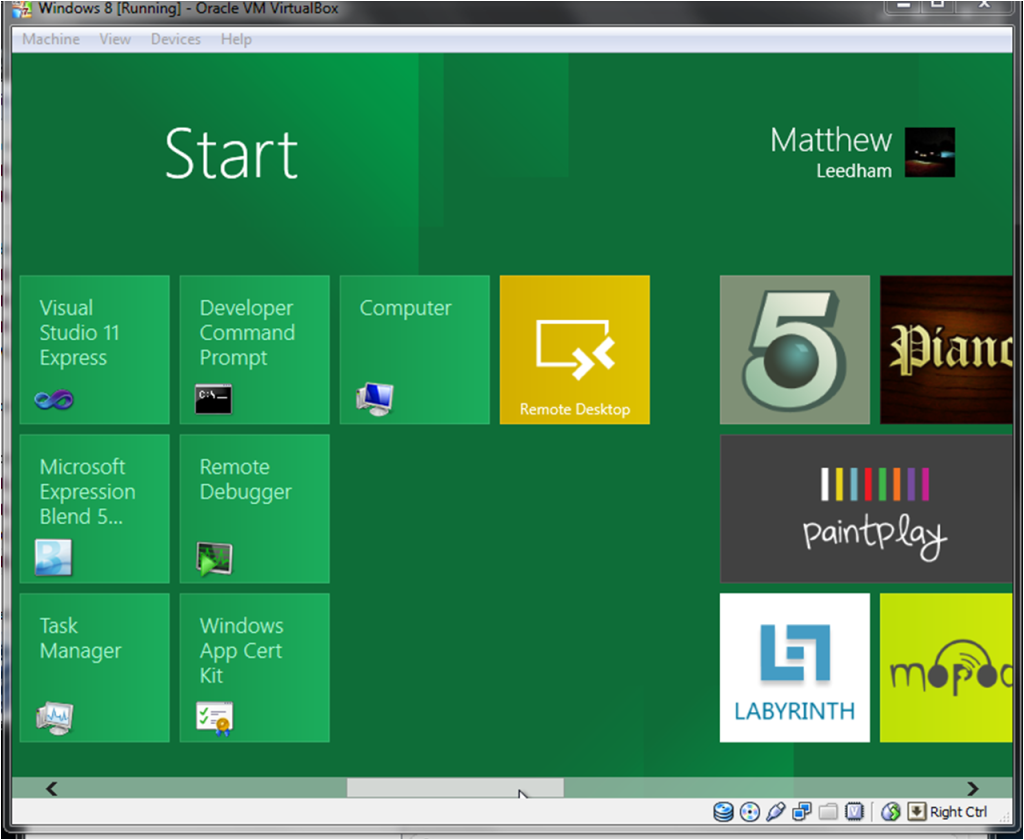
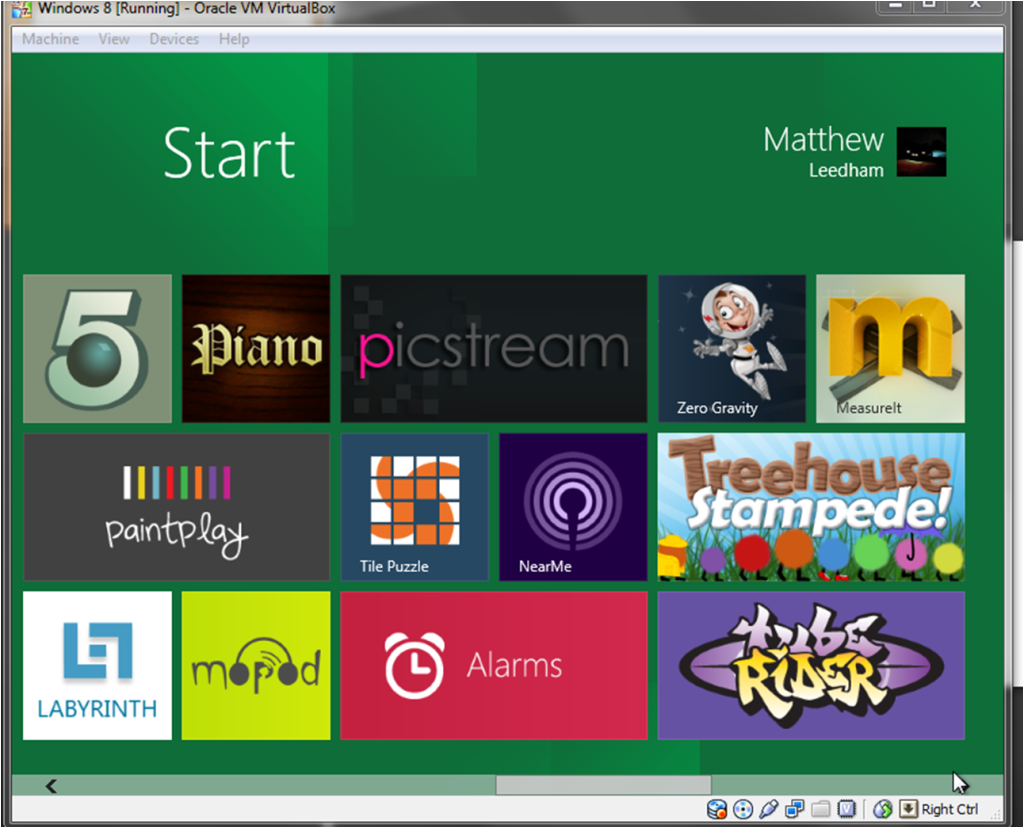
Ok so after a little play the operating system itself seems fairly unrestricted, it's basically (from the little time i've messed with it) a windows 7 for tablets, when you first start up your greeted with the start menu rather the desktop, the 3 images below are of the start menu;


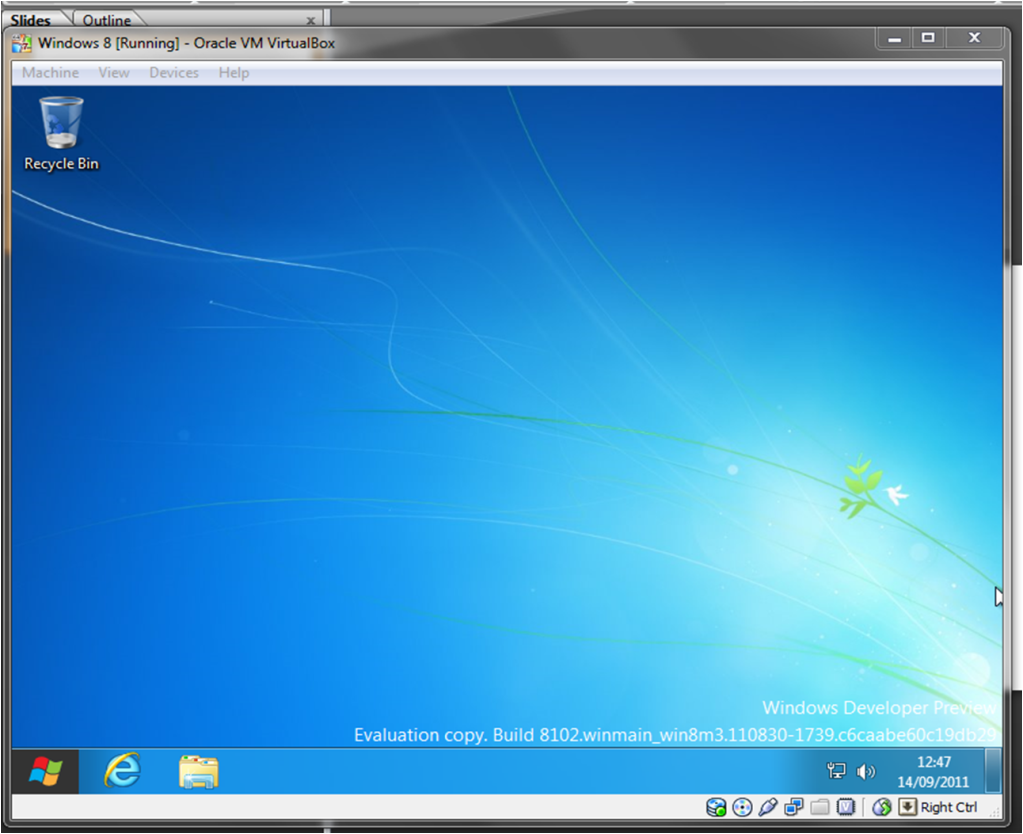
Now the interface itself isn't too bad (although i hate that green! should be able to change it in the full version i would think though), it's got a very tabletly, flash based, internet media feel to it (note it knows my name from my hotmail and profile pic is that of my hotmail also, it asks for it when you first start up), but it also works fine with a mouse. There is still an ordinary desktop(see below) but instead of having a little pop up when you click the start button the menu's (see above) appear;


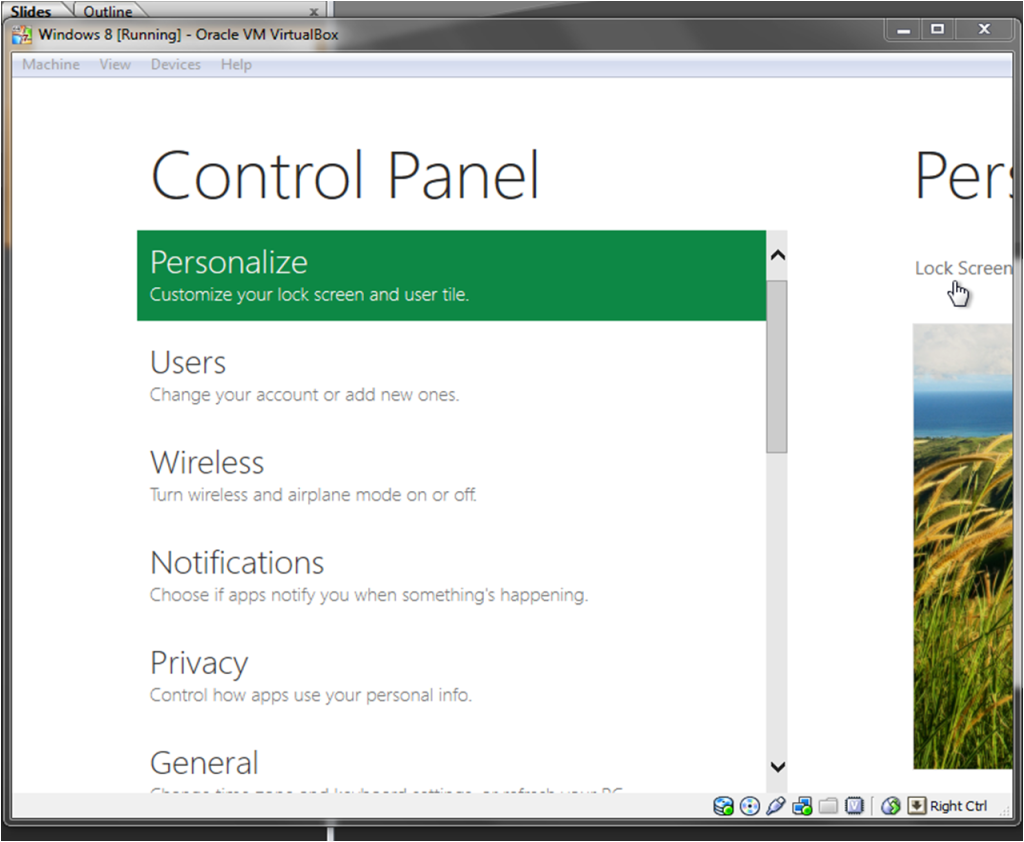
Now the control panel they've made it all flash based along with the start menu but don't be fooled if you click on the more options tab at the very bottom the windows 7 one appears.


Final Thoughts for now;

Right now it seems like there trying to make money out of those who bought windows 7 and those who are jumping on the tablet bandwagon by saying look our OS is tablet friendly (and to those on windows 7 look this ones better its windows 7.1), i honestly don't see the point in it as windows 7 itself is perfectly fine and corrected the issues that came with vista. I guess we will have to wait for the RC version to come out before i can decide but right this moment i see no real point in upgrading unless the rumors are true and xbox games are supported and by the looks of it there certainly trying to integrate it in some ways (see here http://www.escapistmagazine.com/news/view/113001-Xbox-LIVE-Is-Hitching-A-Ride-With-Windows-8-to-Your-PC ).

Final Notes;

- The tabs that i clicked on (didn't click on them all) don't work, tabs such as weather, news and store just make the clicked on animation then do nothing.
- It boots pretty fast and this was on a VM only allowing it 1.5GB of RAM and a single core of my quad running at 3GHz (which backs up the theory that this OS is really designed for tablets), it also ran very smoothly.


I shall continue playing with it i may have a go at installing steam and a game or two to see how it handles it (although i have a feeling this is where the restrictions will be.
 

Smooth Operator

New member
Oct 5, 2010
8,162
0
0
The new interface looks absolutely horrid, I know engineers aren't good at esthetics but god damn can they really not hire a designer for this shit.
 

The Artificially Prolonged

Random Semi-Frequent Poster
Jul 15, 2008
2,755
0
0
Oh dear God the interface is horrible. It so clunky and slow (granted it is a preview build and I running in virtual box) and oh start button what did they do to you? My first impression of this OS is this is looking a like massive step in the wrong direction for Microsoft.

I can understand why OS developers want to make an operating system that work on pc and tablet devices but you have get it right or it won't work and clearly Microsoft have missed the mark on this one. Already the new Gnome 3 desktop environment; which is used in linux OSs has been designed with the same pc/tablet single OS mindset is miles better looking and much much easier to use.

On the plus side the boot time seems quite quick even on virtual box. I've already installed firefox on it and I'm going to try install steam and few other programs, so I think that if a program compatabilty seems to already quite good.


devotedsniper said:
Anyone got this running on a Virtual Machine? VMware i get some error, and microsoft virtual machine 07 (x64 edition) wont install x64 os's (how good is that lol). Looks like i'm going to have to partition my hard drive..
I had to problem installing on virtualbox, I just mounted to the iso in virtualbox and selected the OS type as Windows 7 and it installed fine no problems, quite quickly as well.

This site has a guide for installing Win8 in VBOX, if all the settings are the same as stated in the guide it should work.
http://www.sysprobs.com/guide-install-windows-8-virtualbox


EDIT
Nice little feature I found when looking at the task manager. You can enable and disable startup applications, I like that. On the apps though they look like a pain. I a started one up had little go of it then tried to close by ALT+F4, whoch wouldn't work, I had to close the apps by opening task manager, hopefully there is another way to close them than that.

Steam and games appear to work fine.

Lock screen looks nice, but it has this drag up to see your login animation which is clearly there for touchscreen devices so it looks a bit silly when using a mouse.
 

viranimus

Thread killer
Nov 20, 2009
4,952
0
0
devotedsniper said:
Great overview. Thanks.

Now one thing that I do find a bit intruiging about this is that 8 seemingly will support ARM chipset architecture. Also seeings as it is centric for tablets one would imagine it would have to be either insanely neutered or an insanely optimized rebuild of win7. Given the OS runs under neath the start screen, I get the feeling it would be closer to the latter.

So it makes me wonder how high the system requirements of this would be, because it does immediately draw my mind to my Caanoo and puts visions of going and reflashing the nand on and install 8 on it. Its sort of pointless to actually do so because of the abysmal system specs on it (it would struggle with XP) But it makes me wonder... can it be done.

Also another limitation of VMbox is the notion of steam. It"MIGHT" be able to pull off running a game, but I think the celing for the video card in VM is 128mb as I recall.
 

devotedsniper

New member
Dec 28, 2010
752
0
0
viranimus said:
If you enable 3d acceleration and 2d video acceleration in the options you can allocate 256mb on the video (still not much granted).

To me it seems to be a dedicated tablet or media center os rather than something for all machines, it could be useful for gamers if you want to improve boot times, you could probably rob some of the windows files, load them into your windows 7's directory and thats just going off the fact the os is basically 7, it just seems like a more optimized version of 7 to me.

I just hate what they have done to start, if they had that interface as the new media center then i wouldn't mind but i prefer a nice list of programs considering i have alot of programs installed (2 copies of visual studio, and they each have over 10 links in there folders alone), i don't want hundred's of square icons just for one program.

I think i will set a dual boot up and see what it's like on proper hardware.
 

Doom-Slayer

Ooooh...I has custom title.
Jul 18, 2009
630
0
0
Stall said:
Windows 7 is too hardware intensive to run on a tablet? That must be why there is no such thing as Windows 7 tablets!!

<url=http://www.amazon.com/s/ref=nb_sb_noss?url=search-alias%3Daps&field-keywords=Windows+7+tablet&x=0&y=0O>Oh wait...
Please read what I actually said. I said it was system intensive, not TOO system intensive for tablets. Because knowing how system intensive Win7 is, Win8 will be even more, its not going to go backwards. And if it becomes even more system intensive, almost all of the available RAM will be dedicated to the OS and make running large applications almost impossible.(which apparently tablets arent for)

Stall said:
Ah man, I forget that my tablet doesn't fulfill vital functions, like allowing me to take notes in science and math course where a laptop would be too slow, function as a great e-book reader, code my LaTex documents, function as a full office suite, function as a personal organizer, and act as a PMP. I mean, I pretty much do everything I would on a laptop with my tablet instead, but I guess the wide range of uses I get out of my Android tablet must be nothing beyond fever dreams! Silly me! I forgot that the only use of a PC is to use photoshop and play games! But I thought my tablet DID have games. I must have mistaken the apps I downloaded as something else... thank you for correcting me.
Need a personal organizer? Cellphones have all of that now. Recording notes? Paper. these things don't cost 100s of dollars. This is just my point, tablets are filling a gap that doesn't need filling. If I need a person organizer Ill use a cellphone. If I want a protable computer Ill use a laptop. I don't see why having something in the middle which costs almost the same price for an equivalent laptop.

Also...why would a laptop be too slow for writing notes? Or doing any of those things you mentioned, I use my laptop occasionally to write notes in lectures and it works fine..what are you doing differently?

Stall said:
Man, if you weren't a speaker of truth, then it would almost be like you haven't used a tablet since the 90s and are unaware of the power and functionality of the modern tablet! But of course, you clearly know EXACTLY what you are talking about and AREN'T stuck in the 90s.

And only if some kind of kind of universal system bus that would allow the connection of a keyboard and mouse to a tablet existed. Man, what a CRAZY guy I am! Thinking some kind of port like that exists! Shit, I need to get myself committed!
So you buy a device DESIGNED to be portable, and you have to carry around a keyboard and mouse to actually use common applications and programs. Thats...peculiar. Also I looked around a bit and found "The most powerful tablet in the world" it may or may not be but I found this one.

http://www.tabletkiosk.com/products/sahara/i500_overview.asp

Its basically got a worse processor, 1/4 the RAM, 1/3 of the HDD space, integrated graphics card(hahaa....) smaller screen, no keyboard or mouse(and once you plug those in, it has no USB slots left). And oh..for the CHEAP price of 1750...which is what my laptop cost me almost 2 years ago. So ya...not impressed.

Also a side note. Writing paragraphs and paragraphs in an obnoxious sarcastic tone is not going to get you far. Try writing objectively because even if you didn't explicitly point out that your a tablet user it was very obvious.
 

Stall

New member
Apr 16, 2011
950
0
0
Doom-Slayer said:
Please read what I actually said. I said it was system intensive, not TOO system intensive for tablets. Because knowing how system intensive Win7 is, Win8 will be even more, its not going to go backwards. And if it becomes even more system intensive, almost all of the available RAM will be dedicated to the OS and make running large applications almost impossible.(which apparently tablets arent for)
<url=http://www.techspot.com/news/44650-windows-8-to-have-the-same-system-requirements-as-windows-7.html>So i herd u dont keep up with insanely current tech news...

You know what they say about assumptions!

Doom-Slayer said:
Need a personal organizer? Cellphones have all of that now. Recording notes? Paper. these things don't cost 100s of dollars. This is just my point, tablets are filling a gap that doesn't need filling. If I need a person organizer Ill use a cellphone. If I want a protable computer Ill use a laptop. I don't see why having something in the middle which costs almost the same price for an equivalent laptop.

Also...why would a laptop be too slow for writing notes? Or doing any of those things you mentioned, I use my laptop occasionally to write notes in lectures and it works fine..what are you doing differently?
Given that I study statistics as well as mathematics, I sort of need the touchscreen if I want to use it for note taking. Pen and paper are great, but the organization I get from digitalizing my notes is just wonderful. Not only do they look sharper and are infinitely more accessible than traditional spiral notebooks, but the organization is absolutely wonderful. A pdf per lecture, dated, in a folder corresponding to the chapter of the book, in yet another folder for the midterm associated with that lecture. It?s so much quicker and cleaner than spiral notebooks.

Clearly you aren?t studying mathematics, physics, or engineering, other symbol-heavy fields. There is no way on this green earth that you can compentetly take notes in a symbolic heavy class like mathematics with a laptop. Okay, I want you to type out the double integral of (e^xy)/(xy^2)^1/3 dxdy from 0 to 1-y and 0 to 10 and all prequisite steps to solve this problem with full use of the appropriate symbols on your laptop... in the middle of a lecture. Spoiler: you won?t be able to.

I could even give you something easier, like proving the uniqueness of zero and 1 as neutral elements with respect to addition and multiplication in the set of real numbers. That doesn?t require any symbols, but it would still take you a shit ton longer with a keyboard than it would take me with my tablet. I can?t write AS fast on my tablet as I can with paper, but I write more than fast enough to competently keep up with lectures? something just impossible on a keyboard with the kind of coureses I take.

Doom-Slayer said:
So you buy a device DESIGNED to be portable, and you have to carry around a keyboard and mouse to actually use common applications and programs. Thats...peculiar. Also I looked around a bit and found "The most powerful tablet in the world" it may or may not be but I found this one.
I don?t use a keyboard. I primarily use a capacitive stylus and the onscreen keyboard, which I can get decent enough WPM with. But nonetheless, you can easily use a keyboard with a tablet should you feel so inclined.

Regarding portability, there are plenty of ?keyboard cases,? which feature a keyboard directly built into a case, which is no less portable than carrying around your tablet in a nice portfolio case. This not only gives you the functionality of a laptop, but also the strengths of a touchscreen.

And I paid a little more than 350 for my Android tablet, which does just about everything I could use a laptop for, except for CASs and statistical software (which is something I'd do on a desktop anyways). That's not too horribly much more than a netbook, especially factoring in the wide range of use I get from it.

 

Ingwer-Orang

New member
Aug 26, 2009
42
0
0
Windows 8 looks terrible,i guess for a smartphone this could be a good OS but not for a Desktop PC.I stick with Windows 7.
 

Doom-Slayer

Ooooh...I has custom title.
Jul 18, 2009
630
0
0
Stall said:
Clearly you aren?t studying mathematics, physics, or engineering, other symbol-heavy fields. There is no way on this green earth that you can compentetly take notes in a symbolic heavy class like mathematics with a laptop. Okay, I want you to type out the double integral of (e^xy)/(xy^2)^1/3 dxdy from 0 to 1-y and 0 to 10 and all prequisite steps to solve this problem with full use of the appropriate symbols on your laptop... in the middle of a lecture. Spoiler: you won?t be able to.

I could even give you something easier, like proving the uniqueness of zero and 1 as neutral elements with respect to addition and multiplication in the set of real numbers. That doesn?t require any symbols, but it would still take you a shit ton longer with a keyboard than it would take me with my tablet. I can?t write AS fast on my tablet as I can with paper, but I write more than fast enough to competently keep up with lectures? something just impossible on a keyboard with the kind of coureses I take.
Okay so for this entire paragraph you said the same thing in various ways. Boiling down to "using a tablet for complicated symbols and equations is easier on a tablet". But...why? You have no given me a single reason why it would be easier on a tablet. And you say you can type quicker on a tablet compared to a laptop? Grats? I can type quicker on a laptop. And you say you cant type up things like because a laptop doesnt have the symbols. Um..software? You know, things designed specifically to enable this kind of use on PCs and laptops? Up until tablets has everyone on PCS and laptops just been writing without those symbols because they aren't on the keyboard?

Stall said:
I don?t use a keyboard. I primarily use a capacitive stylus and the onscreen keyboard, which I can get decent enough WPM with. But nonetheless, you can easily use a keyboard with a tablet should you feel so inclined.

Regarding portability, there are plenty of ?keyboard cases,? which feature a keyboard directly built into a case, which is no less portable than carrying around your tablet in a nice portfolio case. This not only gives you the functionality of a laptop, but also the strengths of a touchscreen.
The first bit is kind of my point, the onscreen keyboard is hard to actually type quickly with like you said, so if you want to get the most out of it, you need an extra keyboard. So you are essentially buying extras to make up for the lost functionality.

The thing I find strange is the tablet is filling a particular gap that doesnt really need filling. Tablets are too big to be phones and mp3 players, but can be personal organizer. But...an iPhone for example..is all 3 of those. Then if you want higher end functions like word processing, you can get a laptop which does everything a tablet can do..AND all the higher end functions that a tablet cant do. If you consider all the possible applications you will need for an electronic device on a day to day basis, all those functions can be covered by 2 devices, a laptop and a smartphone. A tablet just fits in the middle, its too big to be a phone or mp3 player, and its too small and not powerful enough to run high end applications.

I have to concede though that your use of the tablet is the only reason I like tablets. The portability is nice and the touchscreen while slightly unnecessary I think is nice. But my point is this..350 dollars, to be able to write notes in class slightly easier, and for a person organizer, which you can do on any half-decent phone these days. And lets face it 350 dollars is cheap for tablets, iPads cost 650+. I really dont see how your getting value for money here when all these functions are available on other devices.